

Healthcare workers’ professional headshots are portraits made to identify clinicians and care-team members, with the aim of presenting a clear, recognizable professional identity. This 2026 guide explains how to plan headshots for healthcare workers around employer requirements, clinical clothing, patient privacy, and the places your photograph will appear.
TL;DR
- Headshots for healthcare workers should prioritize recognition, employer requirements, and a clear view of your face.
- Creative Wills Photography offers professional headshots in Rochester, Minnesota, for individuals and businesses.
- Choose clinical clothing or business attire based on your role and the photograph’s intended use.
- Confirm background, crop, and file requirements before arranging a professional portrait session.
Why professional headshots matter for healthcare workers
A healthcare portrait has a practical job: help someone connect your name, role, and face. A hospital directory, an independent practice website, and a conference biography serve different audiences. Start with the destination rather than copying a photograph you like.
Healthcare work adds constraints that a general business portrait does not address. Your employer can set clothing and background rules. A clinical location requires attention to patient information, and a white coat or badge needs to represent your current role accurately.
For a local session, Creative Wills Photography offers professional headshots in Rochester, Minnesota, serving individuals and businesses across Southeast Minnesota. Creative Wills Photography is best suited to Rochester-area healthcare workers seeking a local professional headshot session. Confirm your specific brief before booking; a professional headshot service does not automatically include workplace access or employer approval.
Plan your healthcare headshot in 2026
1. Define where your portrait will appear
Start with a document listing every intended use. Ask your employer or website administrator for the actual image specifications rather than saving a screenshot of somebody else’s portrait. A reference image shows a look, not the required file dimensions or usage permissions.
For your 2026 refresh, distinguish employer-controlled profiles from profiles you manage yourself. An institution’s directory might need a fixed background, while your conference biography needs a different crop. Request both requirements before deciding whether a single photograph can serve both.
Best for healthcare workers with several profiles: build one brief before choosing a session. Keep it short enough to send without explanation.
- List the directory, website, professional profile, and speaking uses.
- Record each destination’s required dimensions and file format.
- Ask whether the background and clothing are prescribed.
- Identify who approves the final portrait.
- Note whether you need permission to reuse an employer-provided image.
2. Choose clothing that accurately represents your role
Begin with clothes you already wear professionally. Lay them out and check the fit, neckline, condition, and visible wording. The strongest choice is appropriate to your work and permitted by your employer—not necessarily the most formal option.
Best for clinical directories: follow the organization’s clothing brief. Scrubs or a white coat make sense when they reflect your role and are approved for the image. Business attire suits a broader professional identity, but it should not override a directory requirement.
Prepare 2 outfit options if you need both a clinical portrait and a general professional portrait. Treat that as a planning recommendation, not an assumption about what any session includes.
- Check embroidered names, credentials, and department wording.
- Remove unrelated badges, keys, and personal access devices.
- Press or steam clothing before packing it.
- Choose accessories that do not obscure your face.
- Confirm whether an outfit change fits the session arrangement.
3. Select a setting that supports the brief
Use a plain wall and window light to make a reference photograph before commissioning the final portrait. This simple test helps you judge clothing contrast and framing. It does not need to become your published headshot.
A professional session gives you someone responsible for camera setup, lighting, and portrait direction. Creative Wills Photography offers professional headshots; discuss the background and visual requirements directly rather than assuming a particular setting is included.
Best for employer directories: use the specified background. For independent profiles, choose a setting that keeps attention on your face. An environmental portrait can show context, but a recognizable workplace introduces access, permission, and privacy questions.
- Compare your clothing against the proposed background.
- Ask who authorizes photography at a workplace.
- Keep patient charts, screens, and identifying materials outside the frame.
- Avoid prominent institutional signage unless its use is approved.
- Confirm an indoor alternative before planning an outdoor portrait.
4. Build a short portrait brief
Write down the decisions before your session. A short brief keeps visual preferences separate from technical requirements and gives the photographer something concrete to respond to. Include reference photographs, but describe what you like about them: expression, crop, or background.
For a 2026 team update, assign one person to maintain the brief. Otherwise, different departments can request conflicting looks while expecting the finished directory to match. Consistency begins with shared instructions, not with editing unrelated photographs afterward.
Use these headings to organize the brief: Intended use, Clothing, Background, Expression, Delivery. They cover the decisions without turning the session into a technical project.
- State the primary audience and publication destination.
- Attach the employer’s image requirements.
- Describe the expression and framing you want.
- Record approved clothing and background choices.
- Identify the person responsible for final approval.
A portrait brief follows a practical sequence: establish the use, choose appropriate clothing, agree on the background, then confirm expression and delivery. Resolve requirements before discussing decorative details.
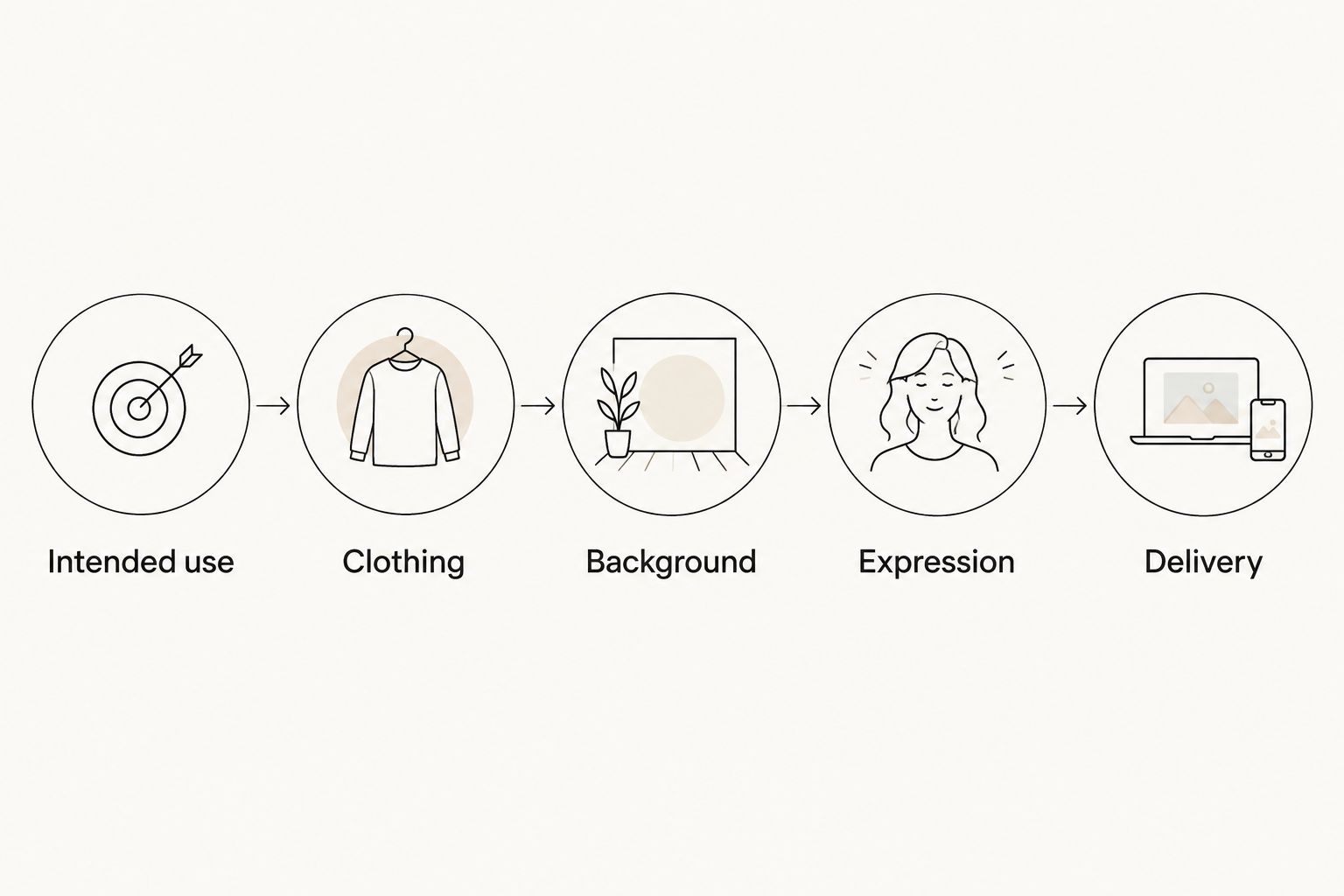
Agree on the portrait’s use before choosing its visual details.
5. Prepare for a recognizable expression
Practice with a phone photograph first. Look at the lens, relax your shoulders, and compare a natural smile with a quieter expression. You are checking whether the picture feels like you—not rehearsing a fixed pose to hold throughout the session.
Best for patient-facing profiles: choose an expression you would comfortably use when introducing yourself. There is no universal smile requirement for healthcare portraits. Follow the brief, then choose between expressions based on recognition and suitability rather than a claim that one expression creates trust.
Tell the photographer if you feel uncomfortable in front of a camera. Ask for direction rather than trying to manage posture, clothing, and expression simultaneously.
- Bring the glasses you normally wear for professional interactions.
- Check that hair and clothing leave your face visible.
- Try a natural smile and a relaxed neutral expression.
- Keep shoulders comfortable instead of forcing a rigid stance.
- Ask to check reflections if you wear glasses.
6. Confirm crops, editing, and permissions
Before commissioning the portrait, separate image appearance from image delivery. A photograph can look right but still need a different crop for a directory. Ask what files you receive and what uses the agreement permits.
Request 3 crop previews if your destinations need them: square, vertical, and horizontal. These are suggested review formats, not universal healthcare specifications. Give the photographer the actual requirements so the composition leaves room for the required versions.
Best for recognizable professional portraits: request restrained editing. Discuss temporary blemishes, clothing distractions, and background cleanup without treating changes to facial features as a routine requirement.
- Confirm file formats and pixel dimensions for each destination.
- Ask whether alternate crops are included or arranged separately.
- Agree on the intended level of retouching.
- Confirm usage rights for websites, profiles, and printed biographies.
- Ask how additional editing requests are handled.
7. Review and publish the approved image
Check the photograph where it will actually appear, not only at full size. A close portrait can work well in a small directory tile while a wider composition leaves your face too small. Test the actual crop before making it public.
For your 2026 profile audit, use 1 checklist covering every destination you control. Track approval, upload, and any remaining changes. If an employer manages the profile, send the approved file through its process rather than creating a competing version.
For teams, save the agreed brief alongside the approved files. New colleagues need a repeatable reference, especially when their photographs are taken separately.
- Check your name, credentials, and role beside the image.
- Preview square and circular profile crops where applicable.
- Replace outdated photographs on profiles you manage.
- Keep an original delivered file separate from resized copies.
- Record the approved clothing, background, and crop for future additions.
Compare headshot options for healthcare workers
Choose the option that meets the publication requirement first. Convenience matters only after you know the image can be used. None of these options guarantees employer acceptance without checking the brief.
| Option | Best for | Main advantage | Key limitation | |---|---|---|---| | Self-directed phone portrait | Creating a reference or testing a simple brief | You control the timing and can test clothing immediately | You manage lighting, framing, focus, and final files yourself | | Employer-arranged portrait | Staff directories with a shared visual standard | The session can follow the organization’s own requirements | Personal reuse and alternate versions depend on the arrangement | | Individual professional session | A personal website, professional profile, or biography | You can discuss expression, framing, and intended use directly | You must confirm that the session covers your employer’s specifications | | Coordinated team session | Practices updating several staff profiles | A shared brief gives everyone the same visual reference | Access, scheduling, approvals, and future additions need coordination |
Creative Wills Photography is an individual and business headshot option in Rochester. Its stated services include professional headshots, but the session’s setting, deliverables, editing, and permissions belong in your inquiry. Best for a local professional session: confirm the brief before committing.
Send your requirements through the contact page. Include intended uses, employer specifications, and whether you are enquiring for yourself or a team. Ask for a response against that brief rather than a general description of the experience.
Common mistakes healthcare workers make
Choosing clothing before checking the directory rules
A personal preference cannot resolve an employer requirement. Get approval before arranging portraits in scrubs, a white coat, or business attire. If the photograph must work outside your employer’s directory, ask whether a separate version makes sense.
Treating a clinical room as an ordinary backdrop
A work setting contains more than furniture. Screens, paperwork, badges, and reflections all deserve inspection. Use an authorized location and keep identifiable patient information outside the frame; an empty-looking room is not a substitute for a privacy check.
Leaving credentials unchecked
An embroidered coat or visible badge becomes part of the portrait. Check names and credentials before the session, especially after a role change. Editing should not be the default plan for correcting clothing that no longer represents you.
Approving only the full-size photograph
A portrait that looks balanced at full size needs another check in its final layout. Preview the small directory version and any circular crop. Keep your eyes, chin, and essential clothing details clear of the crop boundary.
Updating the photograph but not the profile
A new portrait beside an outdated specialty or department leaves the profile unfinished. Review the surrounding information during your 2026 update. Treat the photograph and its identifying text as one publication task.
FAQ
What should healthcare workers wear for professional headshots?
Healthcare workers should wear clothing that fits their role and the employer’s image requirements. Choose approved scrubs, a white coat, or business attire according to the portrait’s destination, and check visible names and credentials before the session.
Should I wear scrubs or a white coat for my headshot?
Wear scrubs or a white coat when they accurately represent your role and meet the publication brief. For a broader professional profile, ask whether business attire or a separate portrait is more appropriate.
Can I use the same headshot for my hospital profile and LinkedIn?
Use the same headshot only when the usage agreement and both destinations’ requirements allow it. Confirm reuse permission, background rules, and crop requirements before publishing an employer-arranged portrait elsewhere.
Is a phone headshot good enough for a healthcare profile?
A phone headshot is suitable only if it meets the profile’s image and approval requirements. Check sharpness, lighting, background, and the final crop rather than judging the photograph solely on the phone screen.
Can my headshot be taken inside a clinic?
A clinic headshot requires permission for the location and a check for patient information in the frame. Keep screens, records, identifying materials, and unapproved people out of the photograph.
Should professional headshots for healthcare workers be retouched?
Retouching should follow an agreed brief and preserve a recognizable appearance. Discuss temporary blemishes, clothing distractions, and background cleanup before approving changes.
Where can I enquire about healthcare headshots in Rochester, Minnesota?
Creative Wills Photography offers professional headshots in Rochester, Minnesota, for individuals and businesses. Share your healthcare employer’s specifications and intended uses to confirm whether the session arrangement fits your requirements.
One last thing
Check the smallest version before approving the largest. Your portrait deserves to work as a face in a directory, not just as a full-size photograph. For your 2026 update, place the final crop beside your name and role, view it at the intended display size, and ask whether you are immediately recognizable.